Photo Framer3.35
Publisher Description
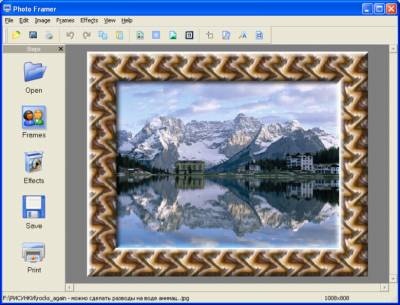
A picture is not complete without a frame. You can have a cute snapshot or a whole gallery of family pictures to email or show on a Web site, but will they impress the viewer? Have a look at portfolio sites of renowned family and wedding photographers. All of their pictures are carefully framed and signed, and all of them impress the viewer. Sure the frame won't make a bad picture look good, but a good matching frame can really enhance your pictures and add to the artistic impression.
If you want to quickly frame a bunch of pictures, a dedicated framing product is what you need. Photo Framer offers a selection of 100 frames included with the product, and offers 200 more frames to download after you purchase a copy. Framing many pictures is as easy as framing a single one. Just select a frame and pick the photos to work on, and Photo Framer will do the rest automatically. You can crop, rotate and resize images on the fly to produce pictures that are easy to email or publish online. Photo Framer supports a variety of border effects, allowing you to create your own frames in just a few clicks. You can also apply a variety of special effects to an image to make it look unique. The effects can be previewed in real time. Photo Framer supports BMP, JPEG, GIF, ICO, WMF, EMF, and PNG images.
About Photo Framer
This Editors program is available in English. It was last updated on 29 September, 2026. Photo Framer is compatible with the following operating systems: Windows.
The company that develops Photo Framer is AMS Software. The latest version released by its developer is 3.35. This version was rated by 1 users of our site and has an average rating of 5.0.
The download we have available for Photo Framer has a file size of 4.2 MB. Just click the green Download button above to start the downloading process. The program is listed on our website since 2010-09-08 and was downloaded 204 times. We have already checked if the download link is safe, however for your own protection we recommend that you scan the downloaded software with your antivirus. Your antivirus may detect the Photo Framer as malware if the download link is broken.
How to install Photo Framer on your Windows device:
- Click on the Download button on our website. This will start the download from the website of the developer.
- Once the Photo Framer is downloaded click on it to start the setup process (assuming you are on a desktop computer).
- When the installation is finished you should be able to see and run the program.
Program Details
System requirements
Download information
Pricing
Version History
version 3.35
posted on 2010-09-08
A lot of new frames and masks.
